20+ Best Portfolio Website Examples for 2026 (by profession)
Contents
20+ Best Portfolio Website Examples for 2026 (by profession)
Your portfolio doesn’t need dozens of projects or years of experience to open doors. It needs to show what you do, how you think, and why someone should work with you.
You don’t have to copy everything. Find one idea that fits your work and make it your own. Check out personal portfolio website examples, find a template that fits your work, and make it your own.
TL;DR:
- Show your best work. 6 to 12 strong projects are usually more useful than a gallery of everything you’ve ever made.
- Explain your thinking. Add a short case study covering the problem, your process, and the result.
- Make your role clear. Tell visitors what you do, who you help, and what you’re looking for.
- Make contact easy. Put a clear call to action above the fold, where visitors can see it without scrolling.
- Keep it fast and mobile-friendly. Optimize images, use responsive design, and make navigation simple.
What makes a good portfolio website?
A good portfolio website makes people think, “I want to work with this person.” You have less than a minute to make that impression, so focus on 6-12 of your strongest projects. The best portfolio websites in 2026 share a few things: a clear intro, case studies that show your process and results, fast-loading visuals, a short About section, and an easy-to-find contact button. Designers and photographers lead with visuals, while writers, marketers, and developers highlight their work and results. A personal domain helps you look more professional.
The best portfolio websites are all about these 5 qualities:
- A clear introduction. One or two sentences explain what you do, your specialty, and the people or businesses you work with.
- A focused selection of projects. Choose work that reflects the opportunities you want next. You don’t need to include every project you’ve completed.
- A story behind the work. Explain the challenge, your contribution, the decisions you made, and the outcome. For UX and product designers especially, a case study is more informative than a gallery of finished screens.
- A recognizable personal brand. Consistent visuals, a natural About section, and a custom domain help visitors remember you.
- A clear way to get in touch. Add a visible contact button, an email address, or a portfolio contact form.
Your portfolio should also work well on mobile devices. Compress images into modern formats such as WebP or AVIF, avoid unnecessary animations, and make sure buttons and text are easy to use on smaller screens.
One more thing matters in 2026: don’t rely on visuals alone. Recruiters, clients, search engines, and AI-assisted discovery tools need useful context to understand your work. Include clear text describing your role, skills, tools, industry, and project outcomes.
| Name | Profession | What works |
| Emma Lesley Art | Artist | Puts artwork and creative identity front and center with a memorable first screen. |
| Andrew Scrivani | Food photographer, author, and director | Uses a dark background, strong imagery, and clear categories to organize photography, video, and other work. |
| Anna Ellenberg | Graphic designer and illustrator | Uses bold colors and a consistent visual identity while making career goals clear to potential clients. |
| Theis Bothmann | Photographer | Organizes photography into visual categories, letting visitors explore different styles and projects. |
| Susan Allen | Videographer | Combines service information, imagery, and clear calls to action to turn visitors into potential clients. |
| Bradley Ziffer | UX and product designer | Uses interactive elements and case studies to show design decisions, process, and outcomes. |
| Spencer Gabor | Graphic designer and illustrator | Pairs a minimal background with colorful artwork, an interactive gallery, and recognizable client names. |
| Jun Lu | Art director and designer | Highlights a clear specialty and recognizable clients to communicate industry experience. |
| Edna Cerrillos | UX/UI designer | Uses clickable project previews to help visitors scan work and open detailed case studies. |
| Peg Fitzpatrick | Writer and social media marketer | Connects professional expertise with content, achievements, and useful resources to build a recognizable personal brand. |
| Aja Frost | Writer and marketer | Makes professional experience and expertise easy to understand, with an emphasis on relevant work samples. |
| Lindsay Ratowsky | Writer and storyteller | Uses a story-driven project to showcase curiosity, communication skills, and personality. |
| John Green | Author | Brings different projects and related content together under a recognizable personal identity. |
| Alex Williams | Digital designer/developer | Combines minimalist design, illustrations, and concise information for a focused professional presentation. |
| Diogo Correia | Developer | Uses personal and academic projects to demonstrate initiative, skills, and learning progress. |
| Adam Smith | Architect | Showcases project photography alongside personal information and contact details for easy browsing. |
| Emma Holistic | Food blogger or wellness creator | Combines a personal story with educational content and clear categories to demonstrate expertise. |
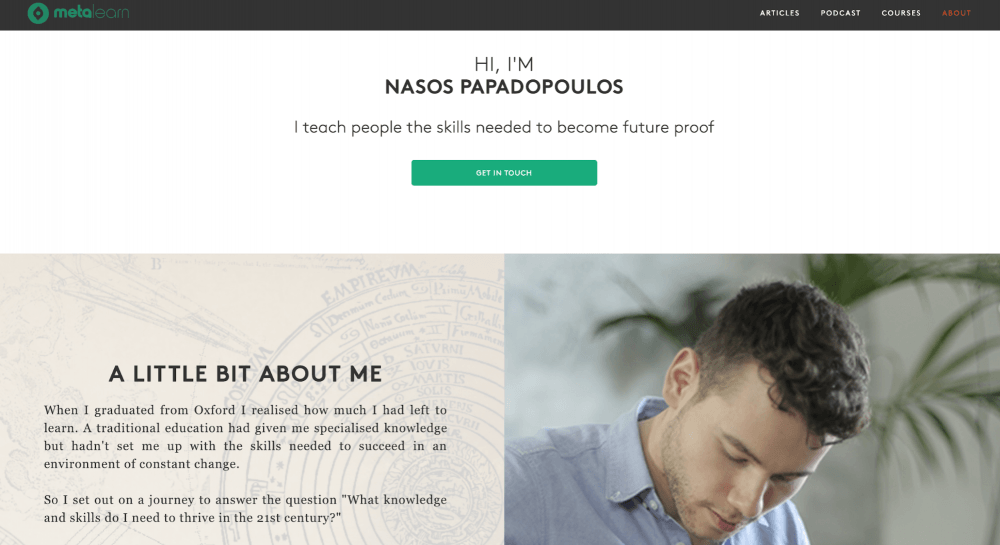
| Nasos Papadopoulos | Teacher and course creator | Organizes self-learning courses and podcasts into accessible resources. |
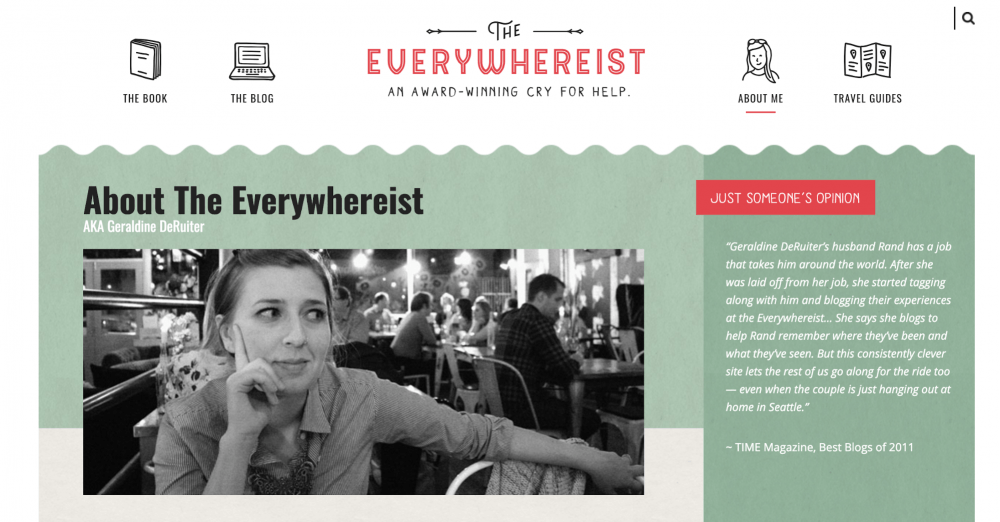
| Geraldine DeRuiter | Writer and blogger | Combines published writing, a personal blog, and social content to showcase work and personality. |
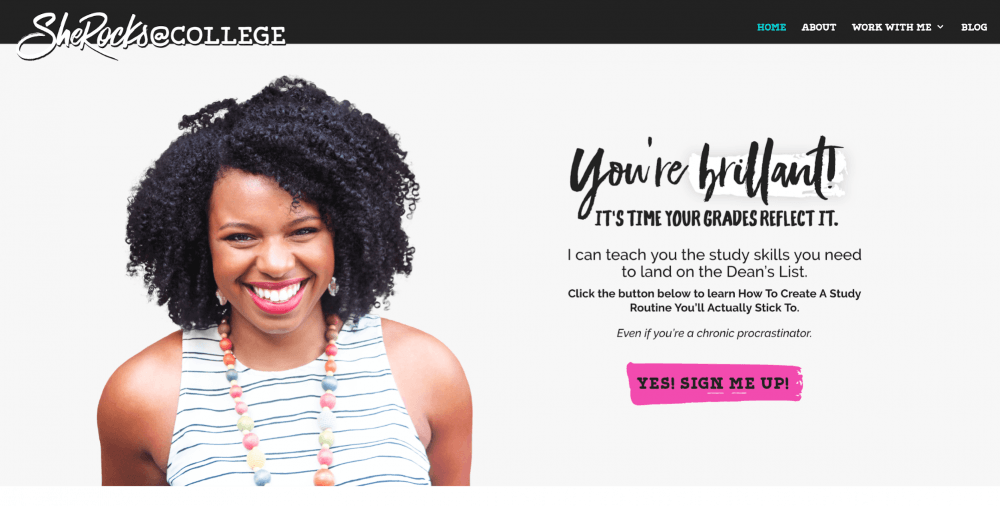
| Clarissa Rodriguez | Teacher and college-success educator | Uses student testimonials to build trust and demonstrate the value of her educational support. |
| Tasha Meys | Blogger and content creator | Connects blog content, personal branding, and social channels to build an audience. |
Artist and photographer portfolio website examples
For artists and photographers, images do much of the talking. The challenge is to present them in a way that feels intentional, loads quickly, and makes it easy to understand what you offer.
Emma Lesley Art. Make the first screen memorable.
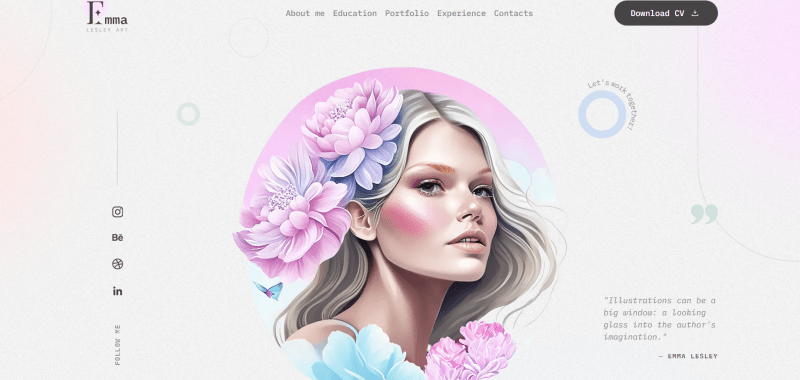
Emma Lesley Art is a professional online portfolio example designed to put the creator’s artwork and identity front and center. This template highlights the most artistic side of the creator.
Why it works: A strong opening visual immediately establishes a modern creative portfolio website. Visitors can understand the general style before exploring individual pieces.
Idea to borrow: Choose one standout image for your hero section. Add a short introduction and a clear link to your work instead of crowding the first screen with multiple messages.
Andrew Scrivani. Give your photography an editorial feel.
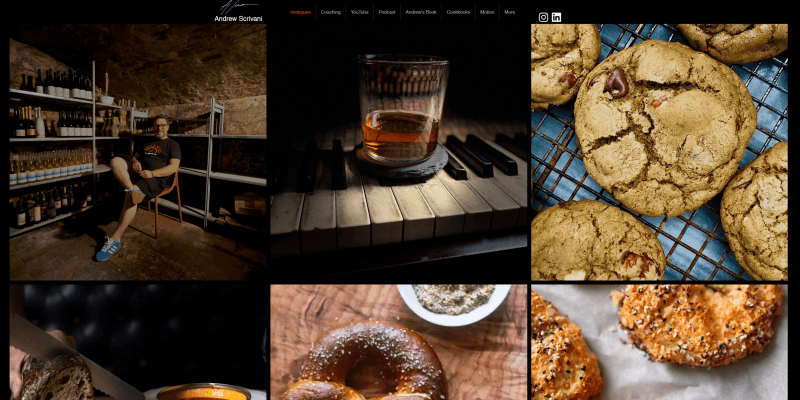
website:https://www.andrewscrivani.com/
Andrew Scrivani is a New York-based food photographer, author, and director. His dark, image-first website organizes photography alongside video, cookbooks, podcasts, and other work.
Why it works: The black background makes the food photography stand out, while simple typography and clear categories keep the focus on the images.
Idea to borrow: Choose a background that complements your work, then organize different formats into easy-to-find categories. Let the images lead without hiding your other services or projects.
If you’re building a photography portfolio website, check out a collection of photography website templates by Weblium.
Anna Ellenberg. Let color express your style.
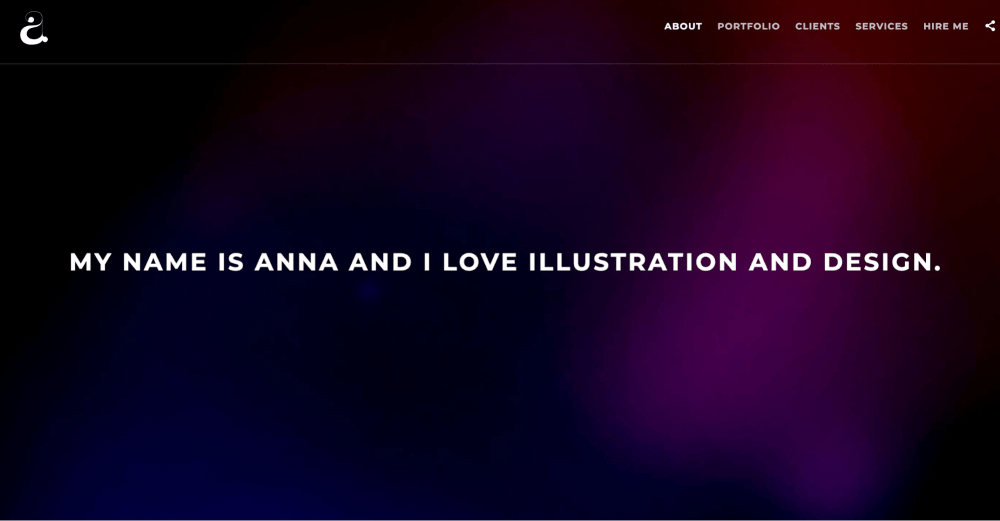
website: http://annaellenberger.com/
Anna Elengerg is one of the best graphic design portfolio examples. The illustrator knows that minimalism doesn’t have to be all monochromatic — deep, bright colors work well, too. Here, you can also find what kind of employment she is looking for so that brands and recruiters know what to expect.
Why it works: A portfolio doesn’t have to be monochromatic to look professional. A consistent visual identity can help your work stand out while making the website feel cohesive.
Idea to borrow: Choose two or three colors that complement your work and use them consistently for backgrounds, headings, and buttons. Keep the artwork itself as the main attraction.
Looking for a concise, understated look? Try this minimalist portfolio website template to showcase your projects without distracting visitors from your work.
Theis Bothmann. Let images lead.
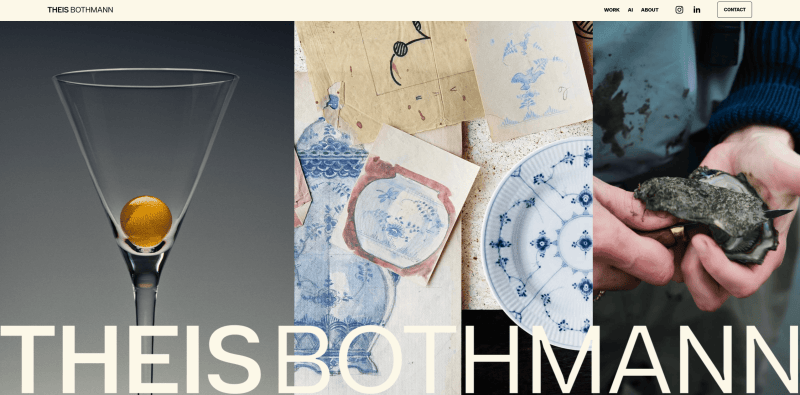
website: http://theisbothmann.com/
Theis Bothmann is a photographer from Denmark, Copenhagen. For a photographer, a portfolio is an essential tool. It is crucial to share photos under your own brand name. This particular website contains little info about the person, but the expressive photos create an indelible impression about his talent and skills. Would you like to create your own website similar to this?
Theis Bothmann is a Copenhagen-based photographer working across food, products, conceptual still life, and lifestyle photography. His website organizes work into visual categories and makes it easy to explore different projects.
Why it works: Visitors can assess the quality and style of the photography without reading long descriptions. Organized galleries also help potential clients find the type of work they’re looking for.
Idea to borrow: Group your images by project, subject, or service rather than putting everything into one endless gallery. Use optimized images and test the page on mobile so your work loads without unnecessary delays.
Need a great photography portfolio website? Check out Weblium’s photography website templates for more portfolio website ideas.
Susan Allen. Connect creativity with services.
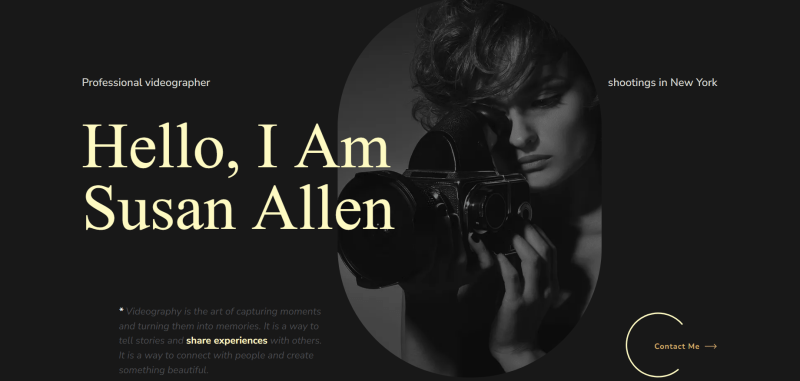
Susan Allen is a videographer website example made in magnificent darker colors, and implementing varying elements. It has a variety of services, photos, and CTA.
Why it works: Potential clients need to know not only what your work looks like, but also whether you provide the service they need. A clear path from the gallery to the contact section makes that decision easier.
Idea to borrow: Add a short list of services beneath your best work, followed by a button such as “Discuss a project” or “Book a consultation.”
Designer portfolio examples
Design portfolios need to do more than look beautiful. They should help visitors understand your design decisions, your specialty, and the value you can bring to a project.
Bradley Ziffer. Bring your design process to life.
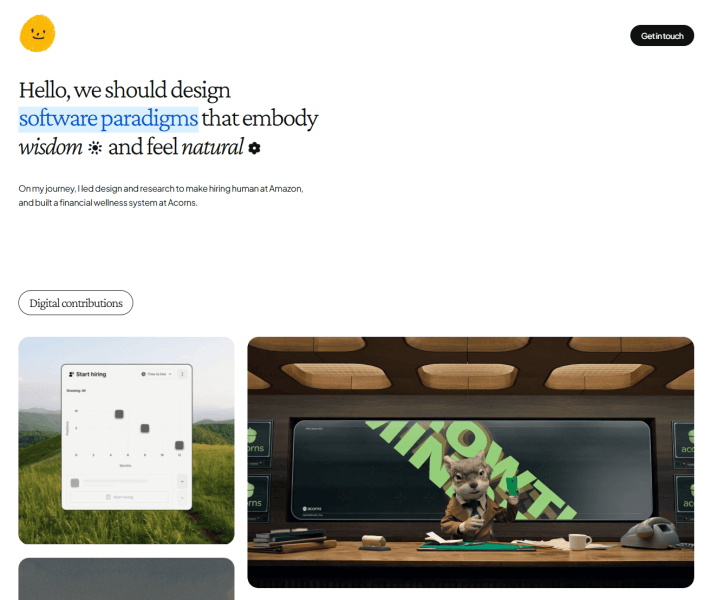
website:https://bradleyziffer.com/
Bradley Ziffer’s portfolio is one of the best UX portfolio examples, making user experience and product design feel interactive from the first visit. Subtle animations, interactive elements, and data visualizations bring his work to life without relying on static screenshots alone.
Why it works: The portfolio shows both the finished designs and the thinking behind them. Instead of simply displaying polished screens, Ziffer uses project narratives and interactive details to communicate his skills, process, and personality.
Idea to borrow: Turn your strongest projects into case studies. Explain the challenge, walk visitors through your key decisions, and show the outcome. If you’re a UX or product designer, even a few well-chosen wireframes or iterations can make your process easier to understand.
Spencer Gabor. Make your portfolio interactive.
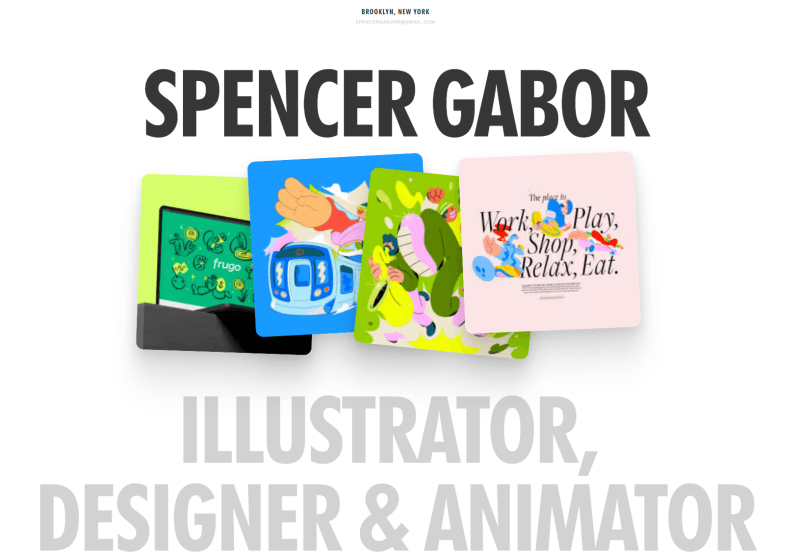
website:https://spencergabor.work/
Spencer Gabor’s graphic design portfolio example uses a minimal white background to let colorful illustrations and designs take center stage. Instead of a conventional vertical gallery, the homepage presents projects in a curved, horizontally scrollable layout.
Why it works: The clean background keeps the focus on the artwork, while the unusual scrolling layout makes browsing more engaging. The recognizable client names also provide context for his experience, and the interactive color control adds a memorable personal touch.
Idea to borrow: Let your work determine the website’s visual style. If your projects are colorful and expressive, keep the surrounding layout simple. You can also experiment with an interactive gallery or a distinctive navigation pattern, as long as visitors can still browse your work comfortably.
Jun Lu. Show your work in the right context.

website: http://junlu.co/
Jun Lu is another great online portfolio example by an art director and designer from New York City. His portfolio highlights recognizable clients and communicates a clear focus on fashion, luxury, and beauty.
Why it works: A defined specialty makes it easier for potential clients to decide whether the designer is a good fit. The client list adds context to the work and helps visitors understand the level of projects he takes on.
Idea to borrow: Put your specialty and a few relevant clients or industries near the beginning of your portfolio. You don’t need household names; even a short list of industries you’ve worked with can help visitors understand your experience.
Edna Cerrillos. Make each project easy to explore.
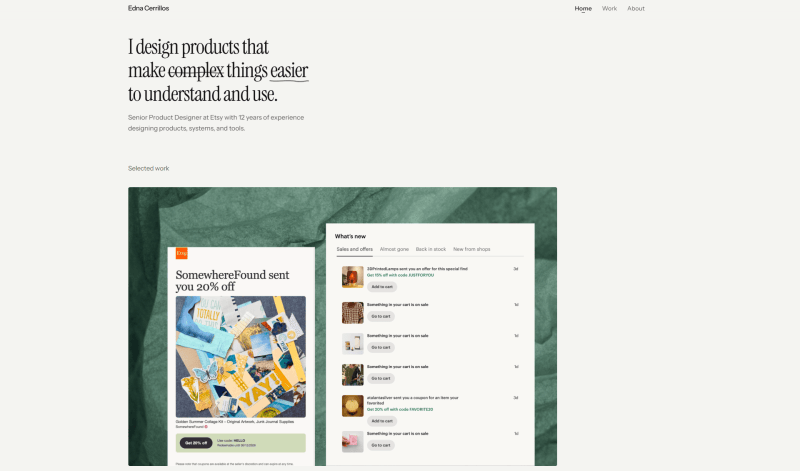
website:https://ednacerrillos.com/
Edna Cerrillos is a UX/UI designer featured for her use of project links within portfolio imagery. The approach connects visual previews to more detailed work.
Why it works: Visitors can scan the page before deciding which project deserves their attention. Clear project links also create a natural path from an overview to more detailed case studies.
Idea to borrow: Give each project a recognizable preview, a short title, and a link to the full case study. If you’re new to UX design, your case study can explain a problem you explored in class and how you approached it.
For more inspiration, explore the best art portfolio examples.
Marketer and writer portfolio examples
Writers and marketers often have less visually obvious work than photographers or designers. Your portfolio needs to show your thinking, your results, and the kinds of problems you can solve. Check out the following selected writer portfolio examples and templates for marketers to get inspiration.
Peg Fitzpatrick. Build a recognizable personal brand.
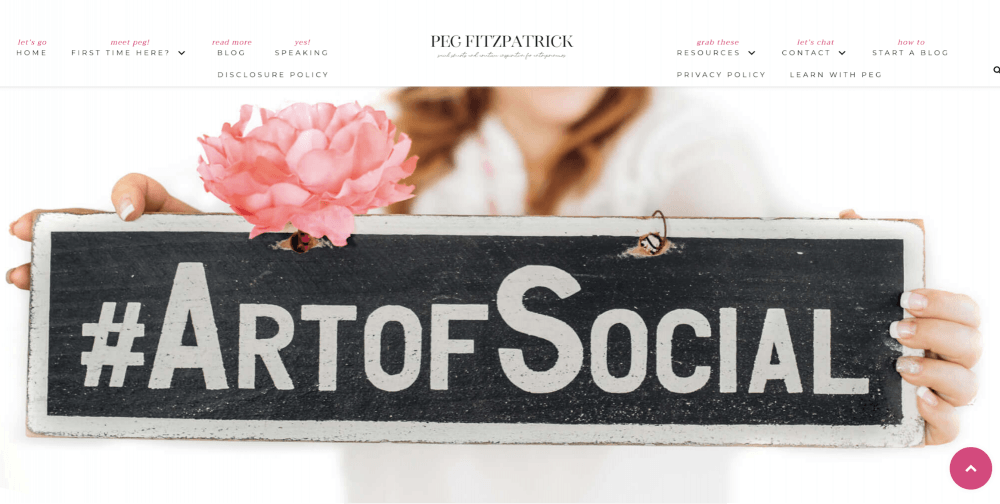
website: https://pegfitzpatrick.com/
Peg Fitzpatrick combines her professional identity with content, achievements, and resources related to social media and marketing.
Why it works: A personal brand gives visitors more context than a list of job titles. It helps them connect your expertise, experience, and point of view.
Idea to borrow: Write an About section that explains your specialty, the work you’re known for, and the people you help. A professional photo and links to your published work can make the page feel more personal.
Need help with your introduction? See how to write an effective About page.
Aja Frost. Make your professional identity clear.
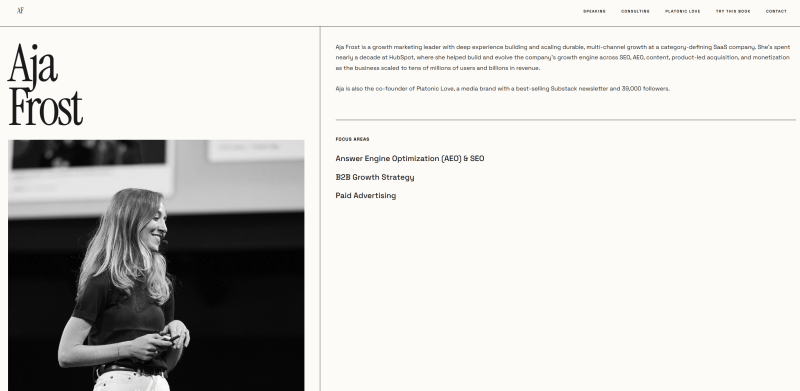
website: http://www.ajafrost.com/
Aja Frost is a writer and marketer whose professional presence connects her work to her wider career.
Why it works: A clear professional identity helps visitors understand your experience and where your expertise fits. For writers and marketers, links to published work and relevant career achievements can be more useful than a purely visual presentation.
Idea to borrow: Put your role, specialty, and most relevant work near the top of the page. Link to published articles, campaigns, or other work samples, and explain your contribution when it isn’t obvious.
Lindsay Ratowsky. Use storytelling to make your work memorable.
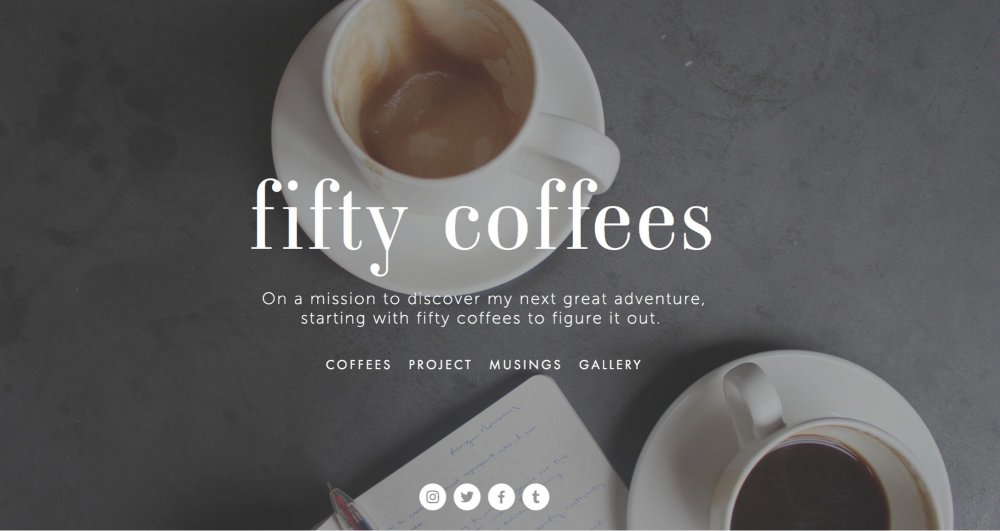
website: http://www.fiftycoffees.com/
Lindsay Ratowsky’s Fifty Coffees is a project built around stories from job interviews and the discoveries that followed.
Why it works: Storytelling gives professional experiences a narrative that readers can follow. It can also reveal communication skills, curiosity, and personality that a conventional CV may not capture.
Idea to borrow: If your work involves research, interviews, or communication, turn a project into a short story. Explain the question you started with, what you discovered, and why it mattered.
John Green. Connect your projects to your identity.
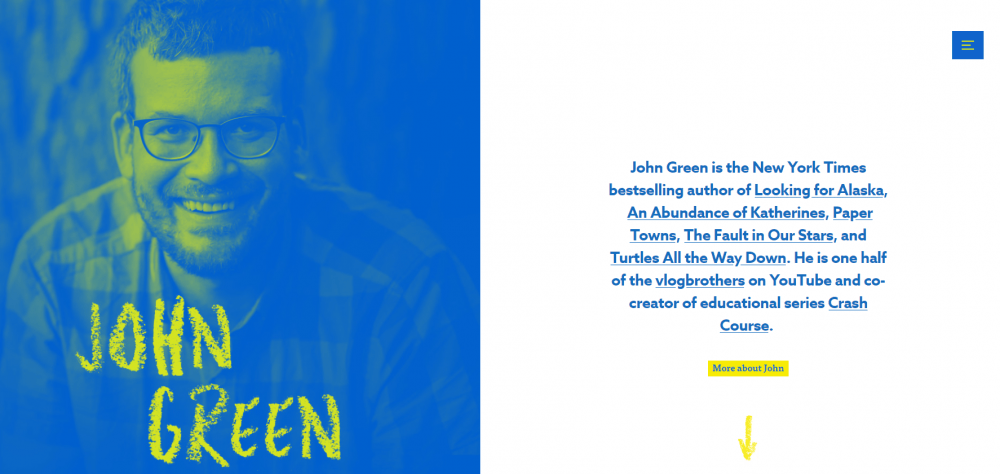
website: http://www.johngreenbooks.com/
John Green’s personal website looks minimalistic, but at the same time bright and comfortable for users. It’s another great example of a personal website built around an author’s work.
Why it works: A personal portfolio can connect several kinds of work under one recognizable identity. It gives visitors a central place to explore projects and find related content.
Idea to borrow: If you publish in several formats, organize your portfolio into clear categories. Keep your main work easy to find and link to your other channels where they add value.
For more portfolio website ideas, browse these freelance writer website examples.
Developer and agency portfolio examples
Developers and agencies need to communicate more than technical ability. Their portfolios should demonstrate how they approach problems, what they built, and what changed as a result.
Alex Williams. Keep the presentation focused.
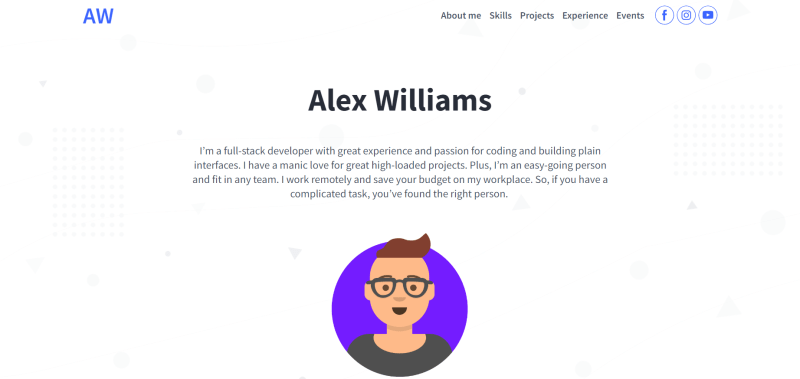
Alex Williams is a professional digital portfolio made on Weblium, a good example of modern visual style with a minimalist design, high-quality illustrations, and brief but complete information
Why it works: A clean layout helps visitors find the important information without distractions. A distinct visual identity can make a developer’s portfolio feel personal without competing with the work itself.
Idea to borrow: Use a concise introduction, a small selection of relevant projects, and a clear skills section. Avoid listing every tool you’ve ever tried; prioritize the technologies that match the work you want to do next.
Diogo Correia. Treat learning as part of your story.

website: https://diogotc.com/
Diogo’s portfolio website also offers a useful lesson for students: projects can show progression, not just finished results.
Why it works: Personal and academic projects demonstrate initiative and help visitors understand how you approach problems. They can also show what you have learned outside formal employment.
Idea to borrow: Choose a project that challenged you and explain how you approached it. Be honest about whether it was coursework, a personal experiment, a volunteer assignment, or paid work.
Beginner and student portfolio website examples
You don’t need a long client list to create a credible portfolio. If you’re a student, changing careers, or looking for your first freelance project, use coursework, personal experiments, volunteer projects, and practice briefs to show what you can do.
If you’re building an acting portfolio, start with a dedicated actor portfolio website template to showcase your headshots, filmography, roles, and awards.
Adam Smith. Use visuals to explain complex work.

Adam Smith is an architecture portfolio template featuring project photography, personal information, and contact details.
Why it works: Architecture and other visual professions benefit from presenting finished work clearly. A well-organized project gallery lets visitors compare styles and understand the kind of work you do.
Idea to borrow: Pair each project image with a short description of the brief, your role, and the most important design decision. If you work in architecture, you can also include drawings, plans, or before-and-after visuals.
For more inspiration, check out a selection of architecture portfolio website examples.
Emma Holistic. Use content to demonstrate your expertise.
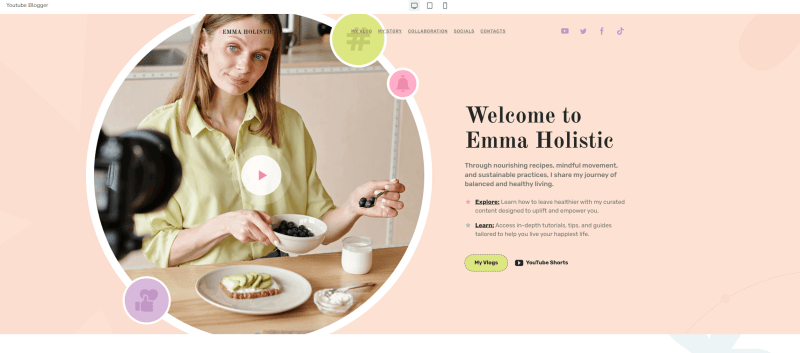
Emma Holistic is a template example for a food blogger or wellness creator, combining a personal story with educational content and organized topics. This template is ideal not only for blogs, but also can work as a good student portfolio example to show projects, academic achievements, or creative work.
Why it works: Helpful content can demonstrate expertise while giving visitors more ways to explore your work. Clear categories make a growing collection of articles, recipes, or guides easier to navigate.
Idea to borrow: If you create content, organize it into a few meaningful categories. Add a short explanation of your approach and make it easy for visitors to find your best work.
Teacher portfolio website examples
A teacher portfolio should do more than list your qualifications. Use it to showcase your teaching approach, highlight courses or educational resources, and build trust with testimonials, student feedback, and examples of how you help learners succeed.
Nasos Papadopoulos. Make learning resources easy to explore.
website: http://www.metalearn.net/
Nasos Papadopoulos is a teacher and course creator who helps people learn independently. His website presents his courses alongside podcasts featuring conversations with professionals.
Why it works: A clear structure helps visitors find the right learning resource, while multiple content formats show the breadth of his expertise.
Idea to borrow: Organize your courses, services, and other resources into distinct sections. If you create podcasts or videos, use them to give visitors another way to experience your work.
If you’re a creator building a portfolio around your content, you can create a content creator portfolio with Weblium.
Geraldine DeRuiter. Let your personality support your work.
website: http://www.everywhereist.com/
Geraldine DeRuiter’s website combines a personal blog with her writing and an Instagram presence. Its approachable design and straightforward navigation help visitors explore both her work and personality.
Why it works: A personal website can bring published work and social content together in one place, giving readers more ways to connect with the author.
Idea to borrow: If your portfolio is built around your writing, combine selected work with a short bio and links to your active social channels. Keep your best writing easy to find.
Clarissa Rodriguez. Let testimonials build trust.
website: http://sherocksatcollege.com/
Clarissa Rodriguez is a teacher who helps college students succeed. Her portfolio features testimonials from students, giving visitors a better sense of the support and results they can expect.
Why it works: Testimonials add social proof and help potential students feel more confident about choosing an educator.
Idea to borrow: Ask past students or clients for specific feedback about their experience. Feature a few short testimonials near your services or course offerings.
Tasha Meys. Turn a blog into a personal brand.
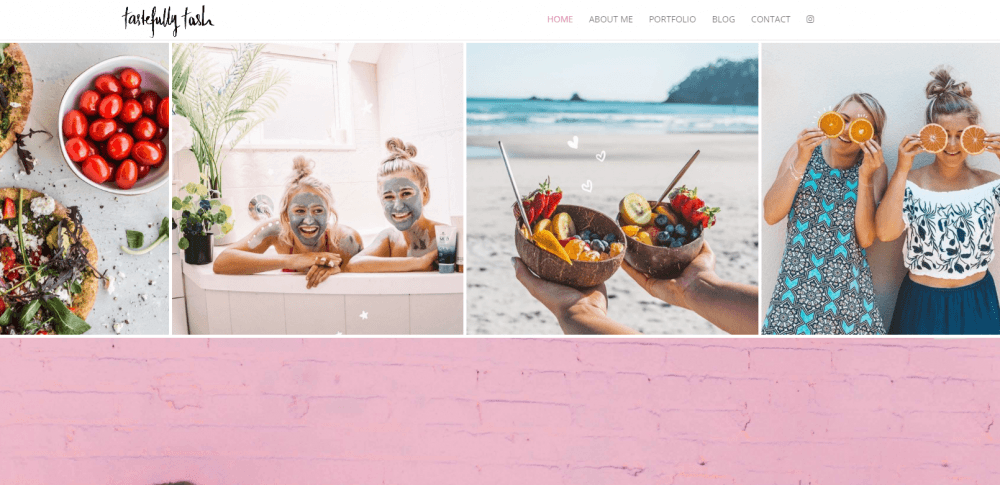
website: https://www.tastefullytash.com/
Tasha Meys’s Tastefully Tash brings together her blog, personal identity, and online presence. Visitors can explore her content and connect with her through social channels, including YouTube and Instagram.
Why it works: The site connects content with personality, helping readers build a relationship with the creator beyond individual posts.
Idea to borrow: Give your portfolio a consistent personal voice and link to the channels where you share your work. A newsletter or subscription option can also help you build an audience over time.
What to include in a portfolio website
Use this checklist before you publish your personal portfolio website. You don’t need every item on day one, but start with the essentials.
- A clear headline: Explain what you do and who you help.
- A short introduction: Add your name, specialty, and a little personality.
- Six to twelve strong projects: Choose examples that match your current goals.
- Case studies: Explain the problem, your process, your role, and the result.
- Project outcomes: Include measurable results when available, such as growth, engagement, time saved, or successful delivery.
- Relevant skills and tools: Use specific terms that help clients and recruiters understand your expertise.
- An About section: Share your background, approach, and professional interests.
- Testimonials or recommendations: Include genuine feedback when you have permission to share it.
- A clear call to action: Add a “Contact me,” “Hire me,” or “Let’s work together” button above the fold.
- Contact details: Provide a working email address or a portfolio contact form.
- A custom domain: Use your name or professional brand where practical.
- Responsive design: Check your website on a phone, tablet, and desktop.
- Optimized images: Use WebP or AVIF where supported and keep file sizes reasonable.
- Accessible navigation: Use descriptive headings, readable text, and meaningful links.
- Updated information: Remove outdated work and check that links still work.
If you’re making a portfolio website for beginners, don’t worry about filling every section immediately. Three thoughtful projects are a better starting point than twelve rushed ones.
How to create a portfolio website in 5 steps
With Weblium DIY website builder, you can build a portfolio yourself without hiring a web studio or learning to code. Start with a simple structure, then improve it as you gain experience.
Step 1. Define your goal and audience
Decide what you want your portfolio to do. Are you looking for a full-time job, freelance clients, collaborations, or admission to a program?
Your goal determines what to show. A UX designer applying for product roles might prioritize case studies and research decisions. A photographer seeking commercial clients might lead with selected shoots and service information.
Write one sentence describing what you do and the opportunities you’re looking for.
Step 2. Choose your strongest work
Select projects that demonstrate the skills you want to be hired for. Quality matters more than quantity.
For each project, prepare:
- The challenge or brief
- Your role and responsibilities
- The process and key decisions
- The final result or what you learned.
If you don’t have professional experience, use coursework, personal projects, volunteer work, or self-initiated concepts. Label them honestly.
Step 3. Choose a platform and layout
You can publish your work on platforms such as Behance or Dribbble, use Adobe Portfolio, or create a personal portfolio website with a custom domain. LinkedIn can complement your portfolio by providing career history and professional connections.
A standalone website gives you more control over how your work is organized and how visitors move from your projects to your contact details.
If you want a quick starting point, check out a collection of Weblium portfolio website templates. Choose a layout that suits your profession, then adapt its colors, typography, sections, and images to your personal brand.
Step 4. Build your pages and refine your content
Start with a homepage, project section, About page, and contact section. Add services, testimonials, or a blog if they support your goals.
You can also use an AI website builder such as Weblium to create an initial website structure and draft content. AI can help you get past the blank page, suggest section layouts, and generate a starting point for your copy.
Then do the important human work: review every section, replace generic text, choose authentic visuals, and write project case studies that accurately reflect your own decisions and contributions. Don’t publish invented achievements or results just because an AI-generated draft sounds convincing.
Step 5. Test, publish, and improve
Before publishing, check your portfolio on mobile and desktop. Test navigation, contact forms, external links, and image loading. Make sure your headline and project descriptions clearly explain your role and expertise.
Use a custom domain if possible, then share the portfolio on LinkedIn, in applications, and in relevant professional communities.
Finally, revisit your portfolio twice a year. Replace weaker projects, update your skills, and add new results. Your portfolio should grow with you.
How AI tools can help you create a portfolio
AI tools can make the first version of a portfolio easier to build, especially if you’re not sure how to structure the site or write your introduction.
With Evo, Weblium’s AI assistant, you can start with a draft structure, customize the design, and use the editor to refine the result. This can help you move from a blank page to a working website faster.
But AI shouldn’t replace your experience or judgment. The most valuable parts of a portfolio are the details only you can provide: why you made a decision, what you contributed, what went wrong, and what the project achieved.
Use AI to create a starting point. Then manually refine your case studies, verify every claim, and make sure the finished portfolio sounds like you.
Ready to get started? Explore Weblium’s portfolio website templates and choose a layout you can make your own.
FAQ
What should a portfolio website include?
A portfolio website should include a clear introduction, selected projects, relevant skills, an About section, and contact information. For project-based work, add case studies explaining your role, process, and results. Testimonials and a résumé can provide extra context.
How many projects should I include in my portfolio?
Start with around 6 to 12 strong projects if you have enough relevant work. If you’re making a portfolio website for beginners, 3 well-presented projects can be enough. Choose work that supports your goals rather than filling the page with everything you’ve done.
How to make a portfolio website without experience?
Start with Weblium’s portfolio website templates. Add your coursework, personal projects, volunteer assignments, and practice briefs to demonstrate your skills. Explain the context of each project and be transparent about your role.
Is Behance enough for a portfolio?
Behance can be a useful way to showcase creative projects, and Dribbble can help designers share visual work. However, a personal portfolio website gives you more control over your branding, project organization, custom domain, and contact experience. You can use both together.
What’s the best portfolio website builder?
Look for a platform that lets you create a free portfolio website with easy drag-and-drop editing and flexible layouts. You should be able to choose a professional template and customize it quickly to match your style without starting from scratch or working with any tech setup.
Should I buy a custom domain for my portfolio?
A custom domain can make your portfolio easier to remember and share. It’s especially useful if you’re building a long-term personal brand. If you’re just starting, you can publish your first version on a platform subdomain and upgrade later.
How do I make my portfolio stand out in 2026?
Focus on relevant work, clear project stories, specific skills, and real results. Use interactive case studies or video previews when they help explain your work, but don’t add effects just to follow a trend. Keep the website fast, mobile-friendly, and easy to navigate.
Can AI build my portfolio website?
AI website builders can help generate a starting layout and draft content. You’ll still need to customize the design, select your strongest projects, write accurate case studies, and verify everything before publishing.
How often should I update my portfolio?
Review it at least twice a year and whenever you complete a project that better represents your current skills. Remove outdated work, fix broken links, and update your contact details and goals.
Need more online portfolio examples?
Explore Weblium’s portfolio website templates and create a portfolio that grows with you!