20+ Best website designs by industry: Small business examples for 2026
Contents
TL; DR
- Your website has seconds to answer: what you do, where you are, and how to buy.
- Put contact details and a booking button where nobody has to look for them.
- Real photos and real reviews sell better than stock smiles.
- Every industry has its “must-have” section (menus, prices, cases, etc.).
- None of these sites needed an agency. Each can be rebuilt from a template in a day.
What makes a good small business website?
What makes a good small business website? A good small business website answers a visitor’s three silent questions in seconds: “What do you do?”, “Are you near me?” and “How do I buy or book?” The best examples all follow the same simple recipe: a homepage headline that names the service and location, contact details and a booking or order button right on the first screen, real photos instead of stock smiles, genuine customer reviews, and a menu with five to seven items at most. Industry changes the priorities: restaurants need the menu and opening hours up front, service businesses need pricing or a quote form, and creatives need case studies. Speed and mobile design matter everywhere, because most people searching for a local business are holding a phone. The 20+ examples below are grouped by industry, and each one highlights the section worth copying for your own website.
Real businesses. Real websites. Built with Weblium. From local cafés and online stores to established companies and service providers, explore websites created by real Weblium users. See how businesses across different industries turn their ideas into professional websites.
Check out a collection of live websites on Weblium
Best website designs by industry at a glance
| Industry | Example | Type | Must-have section |
| Food, restaurants & cafés | Avocado Cafe | Weblium template | Menu and daily specials |
| Food, restaurants & cafés | Nannina | Website | Restaurant introduction |
| Food, restaurants & cafés | Crumb & Co. | Weblium template | Product menu and recipe pages |
| Food, restaurants & cafés | Granny’s Secret | Website | Product categories and ingredient illustrations |
| Beauty, health & wellness | Mia Smith | Weblium template | Service packages |
| Beauty, health & wellness | Olivia Davis | Weblium template | Nutrition services and meal plans |
| Services & agencies | Content Band | Weblium template | Agency services |
| Services & agencies | ELEMENTIS | Website | Interactive innovation slider |
| Services & agencies | HOSS Agency | Website | Visual portfolio |
| Portfolios & creative | Julie Smith | Weblium template | Filmography |
| Portfolios & creative | Kate | Weblium template | Professional experience and client list |
| Portfolios & creative | Martin Foucaut | Website | Project archive |
| Portfolios & creative | DMCG | Website | Animated portfolio |
| Portfolios & creative | Feed Music | Website | Product showcase |
| Events & festivals | Oranjebitter | Website | Festival information and tickets |
| Brand storytelling | O2 SmartNet | Website | Benefit sections |
| Online stores | Moss | Weblium template | Online store structure |
| Online stores | GiftsCoach | Website | Recipient and occasion selectors |
| Online stores | Happy Paw | Weblium template | Product categories and best sellers |
Looking for website design inspiration? Explore 21 beautiful websites from different industries, including award-winning designs, creative layouts, and fresh ideas you can use for your own project.
Check out 21 beautiful website designs
Best website designs for food, restaurant, and cafe projects
Good website examples here need to answer a few basic questions: What’s on the menu? Where is the restaurant? When is it open? Can customers reserve a table?
These restaurant website examples combine appetizing visuals with practical information. The restaurant menu, opening hours, location, and reservation options should be easy to find, especially on mobile devices.
Avocado Cafe — Healthy food & cozy café
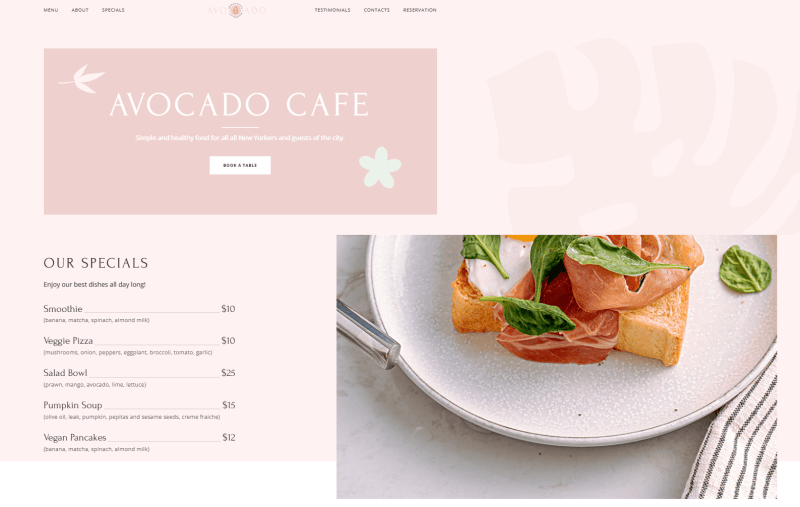
Avocado Cafe is built on a Weblium template and introduces a modern café and its menu. Avocado Cafe website demonstrates how a clean layout, appetizing food photography, and a fresh visual style can help communicate a restaurant’s identity online.
You can explore the menu, discover signature dishes and weekly specials, read customer testimonials, and learn more about the restaurant. The layout also has practical details such as opening hours, contact information, and a form for private-event inquiries.
Section worth copying: The menu and daily specials.
- Make it easy for visitors to discover what your restaurant serves
- Highlight signature dishes with high-quality photos, short descriptions, and prices
- Feature weekly specials to draw attention to seasonal offers and give customers a reason to come back.
Use this free website template
Nannina — Restaurant website
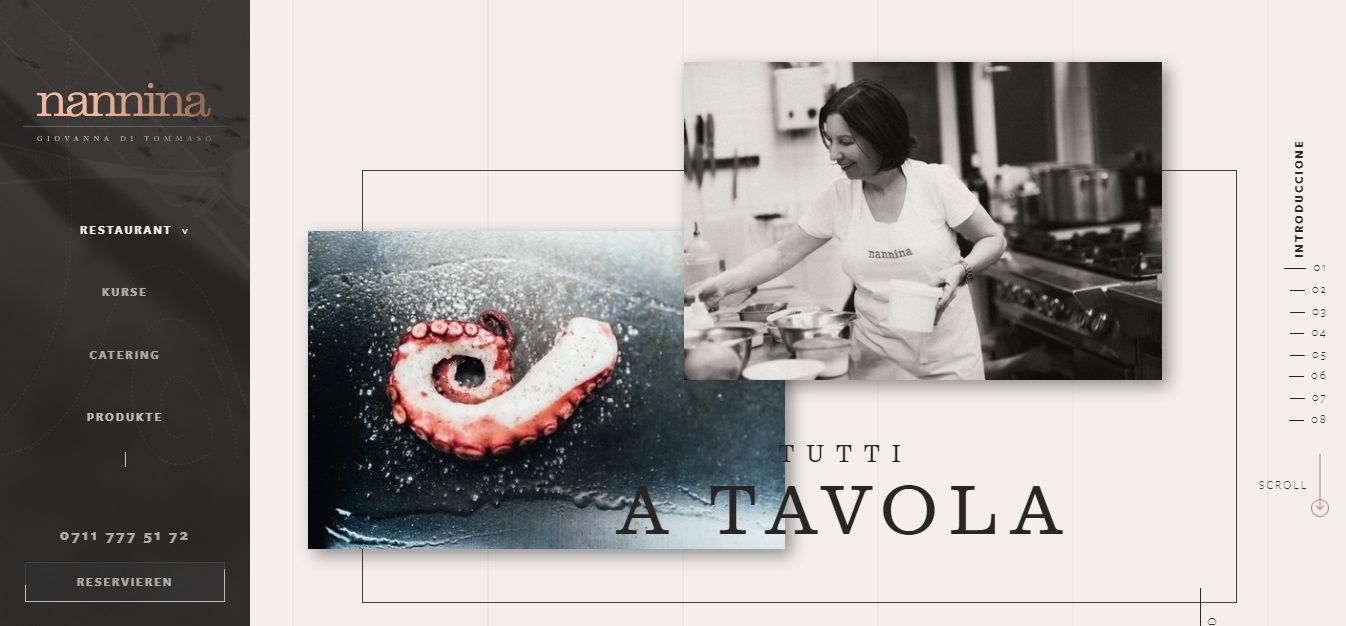
Nannina is a restaurant website created with a strong editorial approach to visual storytelling. Its design combines elegant typography, oversized headings, generous whitespace, and carefully art-directed food photography. The visual identity balances sophistication with warmth.
Section worth copying: The restaurant intro.
- Use large, high-quality photography to communicate the atmosphere and personality
- Combine expressive typography with a short introduction (forget about filling the first screen with lengthy descriptions)
- Use distinctive section headings and small details from your restaurant’s identity.
Crumb & Co. — Pastry Shop & Bakery website
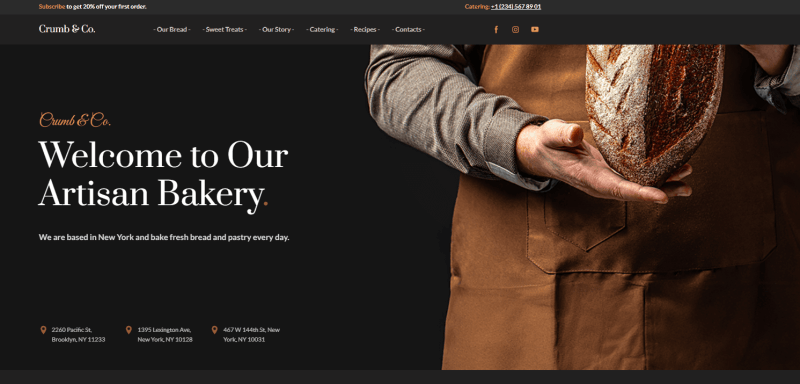
Crumb & Co. has a warm, rustic-inspired visual style that puts freshly baked goods front and center. The design combines a clean white background with carrot-orange and chestnut-brown accents, dark typography, and large food photographs.
On the functional side, the template includes calls to action, online forms, and eCommerce functionality, so it can be adapted beyond a simple showcase into a website that collects inquiries or sells baked goods.
Section worth copying: The product menu and recipe pages.
- Use dedicated categories and appealing photos that help visitors find what they want
- Add recipes to bring visitors back with useful ideas and a closer look at the ingredients and preparation process.
- Turn browsing into action with visible calls to action, inquiry forms, and eCommerce features.
Try this free website template
Granny’s Secret — Traditional food brand
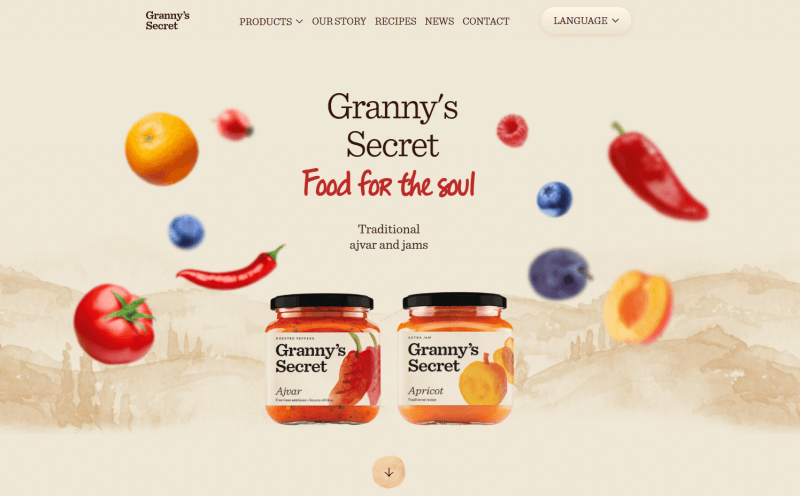
Granny’s Secret is a food brand website that combines traditional recipes with a fresh, modern visual identity. Its design uses warm, natural colors, large product photography, and playful illustrations of fruits and vegetables to communicate the brand’s connection to homemade food and natural ingredients.
Section worth copying: Product categories and ingredient illustrations.
- Organize products into clear categories
- Use illustrations of ingredients around product sections
- Combine product photography with short descriptions and clear category links.
Create a website for your restaurant! Start with a ready-made restaurant layout and customize it with your own photography, menu, and business information.
Explore Weblium’s restaurant website templates
Health, wellness, and beauty salon website examples
The best website examples of beauty, health, and wellness help potential clients understand available treatments, compare services, check prices, and book appointments.
A useful website structure should have service descriptions, specialist profiles, reviews, and convenient contact options. These elements help build trust before a customer visits the salon or schedules a consultation.
Mia Smith — Beauty and fashion website

Mia Smith is built on a Weblium template and is designed for professionals who help clients develop their personal style. This fashion website combines elegant typography, soft neutral colors, fashion illustrations, and lifestyle imagery to create a polished yet approachable look.
The homepage introduces the stylist through a personal welcome section, making the website feel more like an individual portfolio than a corporate service page.
Section worth copying: The service packages.
- Present different service options in separate pricing cards so visitors can easily compare what’s included
- Give each package a clear name and short description that explains who it’s best suited for
- List the included services and add a direct CTA to encourage visitors to get in touch or select a package.
Use this Weblium template for free
Create a website for your beauty business! Present your treatments, introduce your specialists, and give clients an easy way to book appointments. Choose a salon template and customize it to match your brand.
Check out a free beauty salon website design
Olivia Davis — Nutritionist & dietitian website

Olivia Davis’ website introduces the nutrition expert and their approach to healthy eating, then guides you through available services, meal plans, and nutrition advice. Separate service pages provide space to explain individual programs in more detail.
Built on a Weblium template, the website also includes recipes and healthy-lifestyle tips to make it useful beyond simply promoting services.
Section worth copying: Nutrition services and meal plans.
- Present each program as a separate service with a clear description of its purpose and benefits
- Use appetizing food photography and meal examples to make nutrition plans more tangible and appealing
- Add a dedicated page for each service so visitors can explore the details before contacting you.
Try this free website template
Best service business website examples
Professional services and agencies need websites that communicate expertise and explain what makes their services valuable. A portfolio, clear service descriptions, case studies, and accessible contact information can help turn visitors into potential clients.
These service business website examples demonstrate different ways to present creative work, explain an offer, and guide visitors toward an inquiry.
Content Band — Agency website

Content Band is built using a Weblium website template and is designed for marketing agencies, content creators, and businesses offering digital marketing services. Its structure provides a ready-made foundation for presenting an agency’s expertise, introducing its services, and showing potential clients how it can help.
The layout can be adapted to highlight different service offerings, present a portfolio of completed projects, and share useful industry insights. Content Band adapts perfectly to all screen sizes and is user-friendly on mobile devices.
Section worth copying: The agency services.
- Present each service as a separate block with a clear name and explanation
- Explain how each service helps clients solve a specific marketing challenge.
- Add a dedicated CTA to each service section.
Turn this template into a complete website
ELEMENTIS — Luxury Wellness Resorts & Sustainable Living

ELEMENTIS is a website for a luxury wellness and hospitality brand focused on sustainable living, nature, and innovation. Its design combines elegant typography, earthy colors, spacious layouts, and immersive nature-inspired visuals.
One particularly interesting UX element is the horizontal slider that presents five innovation concepts, allowing you to move between topics without leaving the section.
Section worth copying: The innovation sliderю
- Present several key features, services, or ideas in one interactive slider (instead of creating a long sequence of sections)
- Give each slide a clear heading, supporting image, and short explanation
- Add subtle transitions and scroll interactions to encourage visitors to explore.
Hoss Agency — PR agency website example
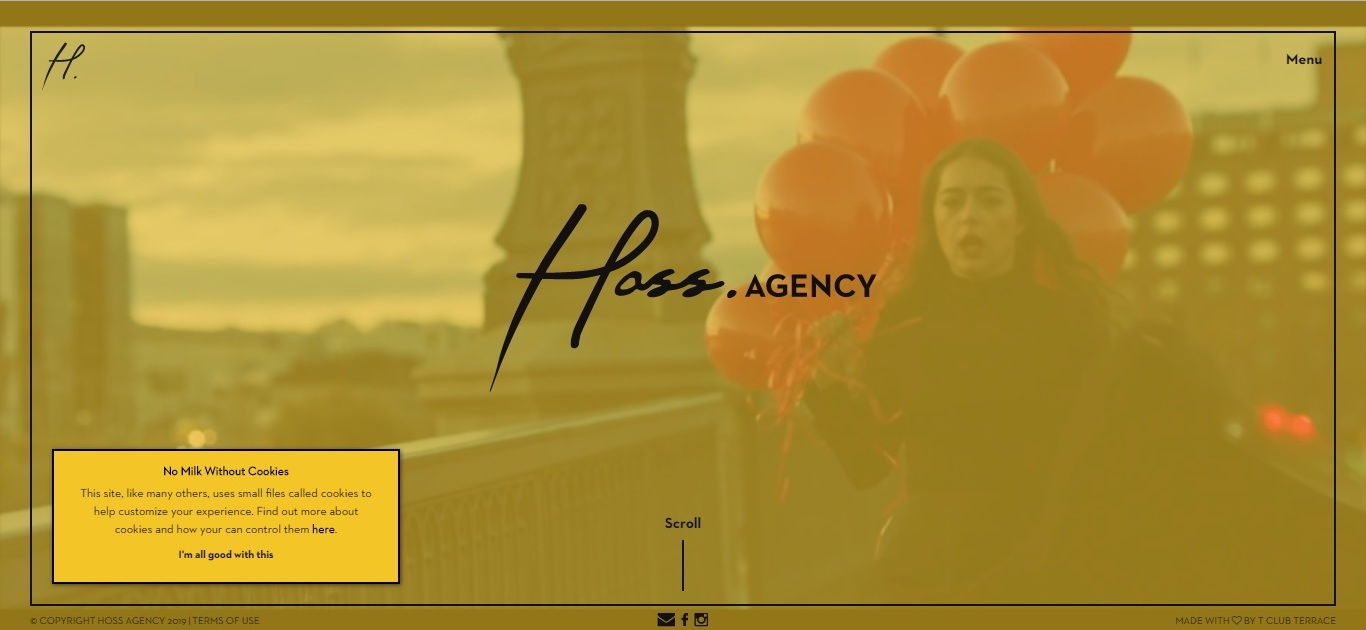
HOSS Agency’s website presents a creative marketing and PR agency through a bold, image-led design. The homepage opens with an unusual metaphor. Large campaign photographs, minimal text, and spacious layouts keep the focus on visual storytelling and the agency’s creative work.
At the same time, the navigation remains simple, making it easy to move between the agency’s work and services.
Section worth copying: The visual portfolio.
- Use large, high-quality campaign images to make your portfolio the main attraction
- Showcase recognizable clients and project names to establish credibility without lengthy explanations
- Organize projects into a dedicated gallery so visitors can browse your work visually and quickly understand your experience.
Create a website for your service business! Choose a template, present your services, and give visitors a straightforward way to contact you.
Check out free business website templates
Best website designs for portfolios and creative projects
Creative portfolios should help visitors understand what you create, explore relevant projects, and find out how to work with you.
These website design examples show different ways to combine storytelling, visuals, and interactive elements.
Julie Smith — Personal portfolio website

Julie Smith’s website is built using a Weblium template for actors and performers. Its visual style combines elegant typography, large portrait photography, and a clean layout that keeps the focus on the person and their work.
The actor portfolio website opens with a personal introduction, a professional title, and key career statistics, giving you an immediate overview of the experience.
Section worth copying: The filmography.
- Organize acting credits chronologically, with the year, production title, genre, and role clearly displayed
- Add a short description and relevant awards to give visitors more context about each project.
- Separate leading and supporting experience to make a long portfolio easier to browse.
Use this free website template
Kate — Personal Portfolio & Professional Resume
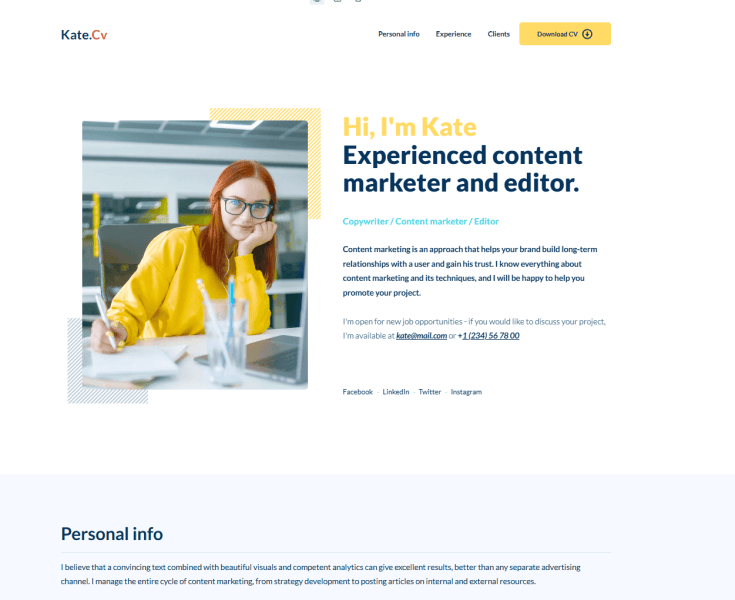
Kate’s personal portfolio combines a clean white and light blue background with coral accents, warm yellow details, and dark navy typography. The design uses clear content blocks to organize information without making the page feel crowded.
The page is structured like an online CV, starting with personal information and moving into professional experience and client names. It also uses content-focused sections to present skills, services, projects, and results, making the template suitable for a wide range of professional specializations.
Section worth copying: The personal experience and clients sections.
- Present your experience in a clear timeline that helps visitors quickly understand your professional background.
- Use client names and logos as social proof to build trust and demonstrate your industry experience.
- Highlight skills through specific projects and results instead of relying on a generic list of qualifications.
Turn this template into a complete website
Martin Foucaut — Motion design & creative portfolio
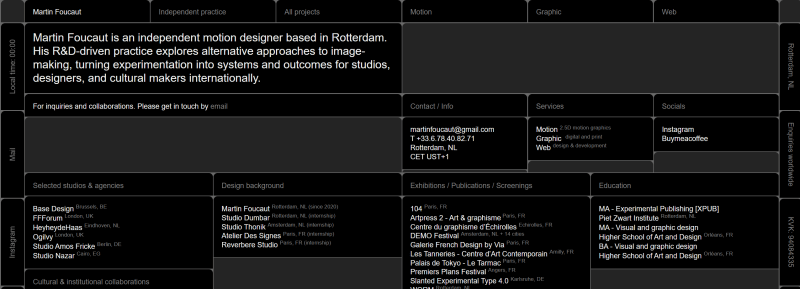
Martin Foucaut’s portfolio has a minimal, almost archival aesthetic that puts the creative work at the center of the experience. The design uses a restrained color palette, small typography, thin separators, and a highly structured layout.
The main design feature is the extensive project archive. The archive mixes motion graphics, visual identities, web design, posters, and experimental typography, creating a varied visual rhythm as you scroll.
Section worth copying: The project archive.
- Use a structured editorial layout to present projects with clear titles
- Mix different media formats (animated previews, static images, videos, and graphic experiments) to make the portfolio visually varied
- Add collaborator credits to acknowledge everyone involved and provide a clearer picture of your role in each project.
DMCG — Brand & Software Design Portfolio
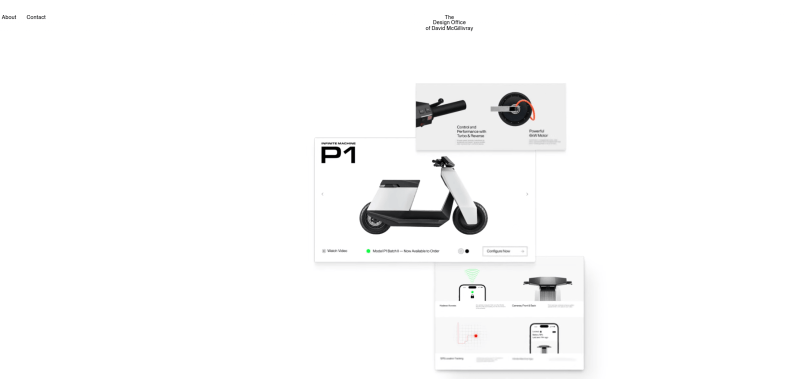
DMCG is a minimalist portfolio with a clean white background, simple black typography, and generous whitespace. The layout feels light and uncluttered, with very little visual noise. There’s no oversized hero imagery or elaborate introduction — the design keeps things simple and lets the work speak for itself.
Section worth copying: The animated portfolio.
- Use motion to showcase the work with animated previews that offer a glimpse of each project
- Give projects room to breathe through generous spacing that makes each case stand out
- Keep the interface minimal with a white background and restrained typography that put the focus on the work.
Feed Music — Music Sharing & Digital Platform
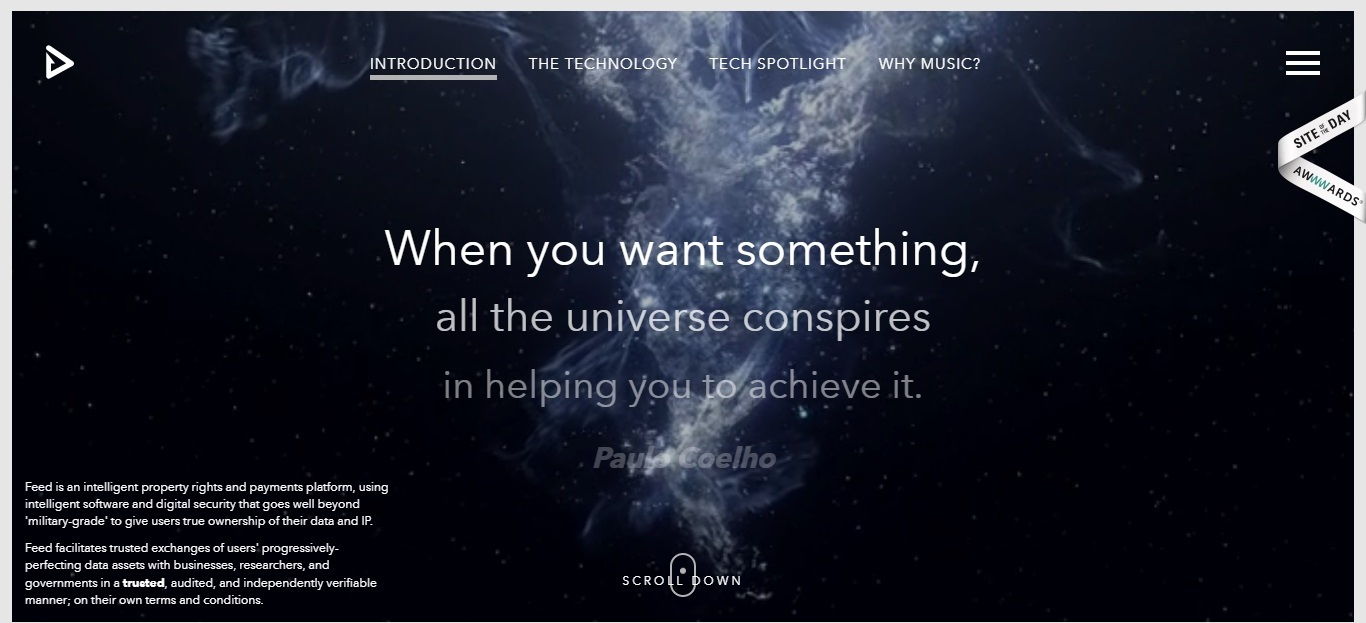
Feed Music uses a cinematic, immersive design with a dark background, deep blue tones, and atmospheric imagery that evokes a sense of space and depth. The homepage opens with a large quote set in white typography, with the text gradually fading into the background as you read.
A dedicated case study video offers a closer look at the product in action, while the Contact page uses a bold blue background and a large, easy-to-follow form.
Section worth copying: The product showcase.
- Show the product in context with laptop and smartphone mockups that demonstrate how the interface works across devices
- Use video to explain functionality through a real product walkthrough or case study
- Make contact forms part of the design with bold prompts and a simple layout.
Oranjebitter — Festival website example
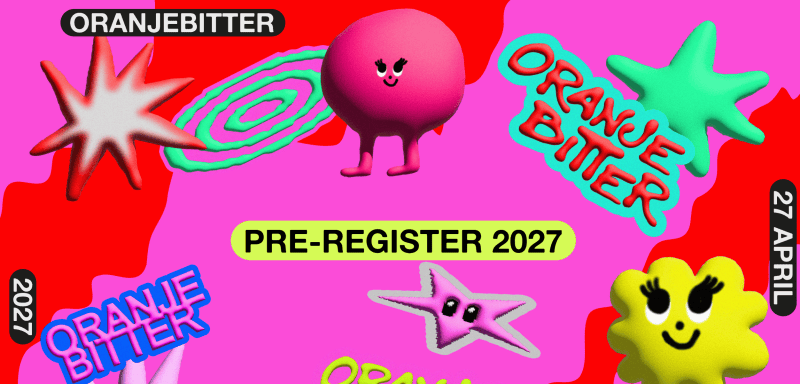
Oranjebitter has a bold, energetic visual identity that reflects the atmosphere of a large outdoor music festival in Rotterdam. The website is built around the festival’s orange-themed branding, with expressive typography, vibrant colors, and event-focused visuals.
Oranjebitter serves as both a promotional platform and a practical information hub for festivalgoers. You can explore event details, check the lineup and festival news, find the location, and access ticket information.
Section worth copying: The festival information and ticket section.
- Put essential event details front and center with clear information about the date, location, lineup, and tickets
- Build excitement with bold festival visuals that communicate the event’s atmosphere before visitors even arrive
- Make ticket access easy with prominent calls to action that take visitors directly to the purchase process.
O2 SmartNet — Brand Storytelling & Digital Wellbeing
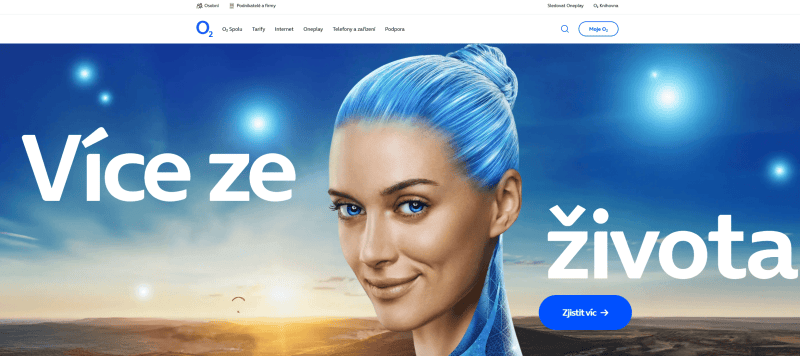
This O₂ Czech Republic campaign page uses a visual, immersive approach to communicate the idea that technology should make everyday life better. The design combines a deep blue brand palette, large photographic backgrounds, bold typography, and layered visual compositions.
Functionally, it works as both a brand storytelling page and a navigation hub: you can explore the Moje O₂ app, mobile and internet services, cybersecurity solutions, and digital wellbeing resources through dedicated links.
Section worth copying: The four benefit sections.
- Organize complex information into clear themes such as connection, security, possibilities, and digital balance
- Combine emotional imagery with practical details to connect brand values with real products and services
- Guide visitors to relevant next steps with contextual links that lead from each benefit to a related service or resource.
Best online store website designs
Online stores need to help visitors discover products, compare options, and make purchases. Clear product categories, strong photography, and straightforward navigation are essential.
These website design examples demonstrate how product-focused websites can make their offers easier to explore.
Moss — Skincare & Beauty shop
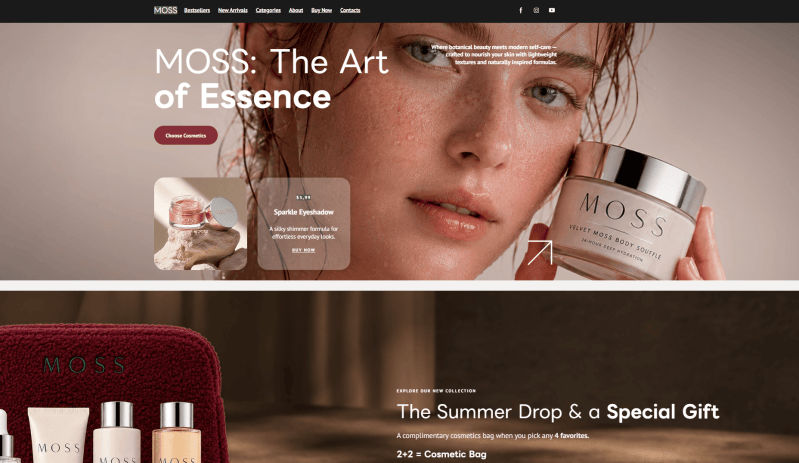
Built on a Weblium template, Moss’s website balances a professional skincare aesthetic with a more vibrant retail look, making it suitable for cosmetics brands, skincare shops, and beauty businesses.
The homepage goes beyond a traditional online catalog: it introduces the brand, showcases skincare products, highlights professional cosmetic care, and presents consultation services. From a shopping perspective, the separate Cosmetics and Gift Sets pages give customers clear paths to browse products and ready-made collections.
Section worth copying: The online store structure.
- Separate products into dedicated collections to make browsing more intuitive.
- Feature selected products on the homepage so visitors can instantly discover popular items
- Give ingredients their own page to answer questions about product composition
- Connect product presentation with educational content.
Use this free website template
GiftsCoach — Gift Finder & Gift Inspiration Platform
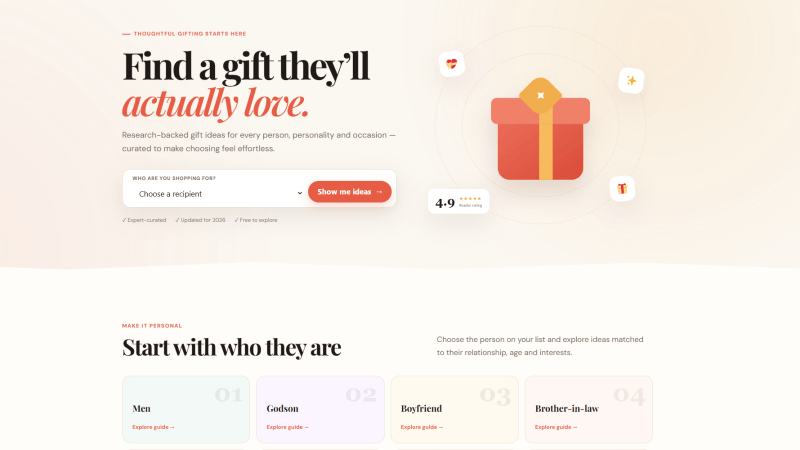
GiftsCoach has a friendly, colorful design that makes gift discovery feel simple and approachable. A prominent recipient selector encourages you to start browsing right away, while small trust indicators highlight expert curation, updated recommendations, and free access.
GiftsCoach is structured around several ways to discover gift ideas. You can browse by recipient, occasion, or the latest gift guides, with dedicated categories for different relationships and celebrations.
Section worth copying: The recipient and occasion selectors.
- Help visitors find relevant content faster with clear browsing categories based on recipients and occasions
- Make the first step easier with a selector that lets users start their search directly from the homepage
- Keep content discoverable by featuring the latest guides with publication dates and direct links.
Happy Paw — Pet Store & Online Shop
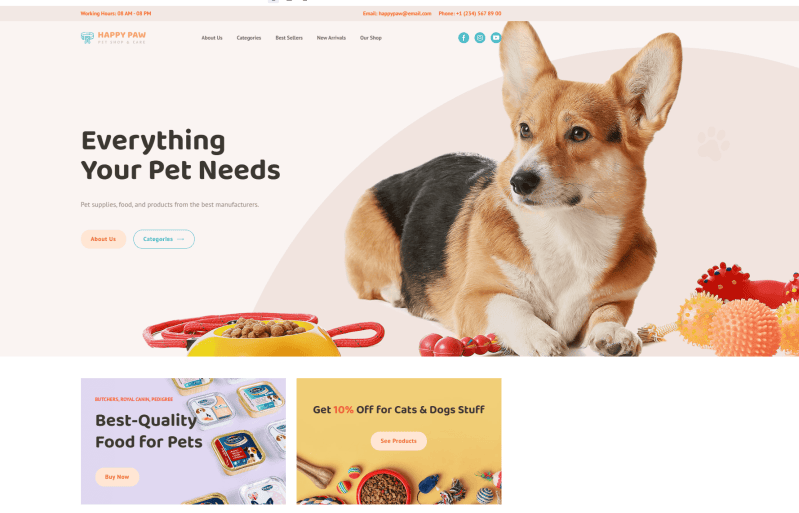
Built on a Weblium template, Happy Paw’s website has a cheerful, playful design built around a warm pastel palette of white, peach, bright orange, and turquoise. The layout balances large promotional visuals with neatly organized product sections, while bright orange accents draw attention to important headings and calls to action.
You can browse supplies for cats and dogs, explore food, treats, toys, and other pet essentials, and discover featured and newly added products. On the functional side, Happy Paw’s website supports eCommerce, with product listings, shopping-related calls to action, and online forms.
Section worth copying: The product categories and best sellers.
- Use playful imagery and illustrations to create an emotional connection and reinforce the store’s identity
- Feature best sellers on the homepage to give visitors a shortcut to popular products.
- Highlight new arrivals to keep the storefront fresh and encourage returning customers to explore what’s new.
Turn this template into a complete website
Stereoscope — Coffee & Lifestyle Merchandise Shop
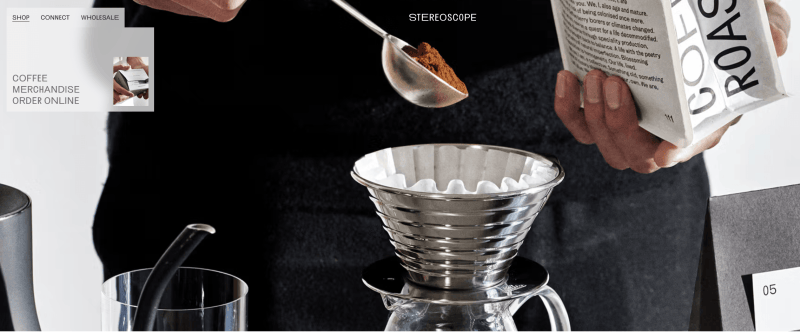
Stereoscope Coffee uses a refined, minimalist design that carries its distinctive packaging identity. Product photography takes center stage, while the restrained palette and consistent typography create a clean, editorial feel.
The merchandise page follows the same visual language, making the shopping experience feel like a natural extension of the brand. This makes the store functional while keeping the interface visually uncluttered.
Section worth copying: The product catalog and product pages.
- Use a spacious product grid with generous whitespace to create a calm, premium shopping experience
- Maintain a consistent brand identity across the storefront, product pages, packaging, and merchandise
- Add a shopping bag indicator so customers can easily keep track of the items they plan to purchase.
Create your online store with Weblium! You don’t need to build an ecommerce website from scratch. Choose a ready-made layout, add your products, organize categories, and configure your store to accept orders.
Create an online store
Must-have pages for a local business website
You don’t need dozens of pages to launch a useful website. Start with the essentials and add more as your business grows.
Use this checklist when planning your website:
- Home page. Explain what your business does, who you serve, and what visitors should do next.
- About page. Introduce your business, its story, values, and team.
- Services or products page. Describe your offer, its benefits, and what customers can expect.
- Pricing page. Show prices, packages, or starting rates whenever possible.
- Portfolio or case studies. Demonstrate your experience with examples of completed work.
- Reviews and testimonials. Add genuine customer feedback to build trust.
- Contact page. Include your phone number, email, address, opening hours, and contact form.
- Booking or ordering page. Give visitors a way to book appointments, request quotes, make reservations, or purchase products.
- FAQ page. Answer common questions about your services, payment methods, delivery, or booking policies.
- Privacy policy. Explain how you collect and use visitors’ personal information.
Remember, not every business needs a separate page for each item. A freelancer might combine services, a portfolio, and an About section on one homepage. A restaurant might need separate menu and reservation pages.
Want to introduce your team memorably? A well-designed team page helps put faces behind your business and build trust with potential customers. Find the right way to showcase your people.
Explore 20+ Meet the Team page examples
For a local business website, make sure your address, service area, phone number, and opening hours are easy to find. Keep these details consistent with your Google Business Profile.
The goal isn’t to publish as many pages as possible. It’s to give visitors the information they need to make a decision.
Online booking, payments, and delivery: must-have features for small business
Online booking, appointment scheduling, and payment options are standard features for businesses.
For service businesses, add an online booking form that lets customers choose a service, select an available time, and submit a reservation. If you sell products, make sure visitors can pay directly through your website instead of having to arrange every order manually.
Local payment methods and delivery integrations are especially important for businesses selling within their own markets. Customers want familiar ways to pay and convenient delivery options. Weblium supports different payment integrations, as well as delivery options. This makes it easier to build an online store that fits local shopping habits without relying on complicated third-party solutions.
Start with a professionally designed template. Customize the design, add your content, and make it your own. No coding required.
Use a small business branding website template
FAQ
What makes a good small business website?
A clear headline, visible contact details, a booking or order button, real photos, reviews, and simple navigation.
What pages should a small business website have?
Home, About, Services or Products, Contact, and optionally Reviews, FAQ, and Blog.
What is the best website design for a restaurant?
One that shows the menu, opening hours, location, and a reservation button on the first screen.
How much does a small business website cost?
A website builder plan costs from a few dollars a month; a custom agency site can cost thousands.
Can I build a professional business website myself?
Yes, with a website builder and an industry template, you can launch without code, and Weblium also offers done-for-you setup.